





Financial reports can be quite challenging, especially when data is scattered across various systems. What if everything could be automated? With BigQuery and Looker Studio, this becomes possible. Let’s break down, step by step, how a company can completely transform the way it manages and analyzes financial data.
Example: A Retail Company Analyzing Costs and Revenues
Context:
Imagine a company that tracks its expenses in an ERP system (Enterprise Resource Planning) and its revenues in a CRM system (Customer Relationship Management).
- In the ERP: Expenses related to salaries, rent, marketing, and other operational costs.
- In the CRM: Revenue from sales, client data, and product categories.
Problem:
The finance team spends hours trying to combine this data to generate profitability reports by product category. Often, the reports are incomplete.
Solution:
Complete automation with BigQuery and Looker Studio, bringing all the data into one place where it can be processed and displayed automatically.

How Does It Work?
1. Importing Data into BigQuery
The first step is to import all the data into BigQuery so that it can be processed in one place.
- From the ERP: Export a weekly CSV file containing expenses by department and cost category. This file is uploaded to BigQuery using Google Cloud Storage.
- From the CRM: The CRM provides an API for automatically extracting sales data. A pipeline is built using Cloud Dataflow to transfer this data directly into BigQuery.
2. Organizing Data in BigQuery
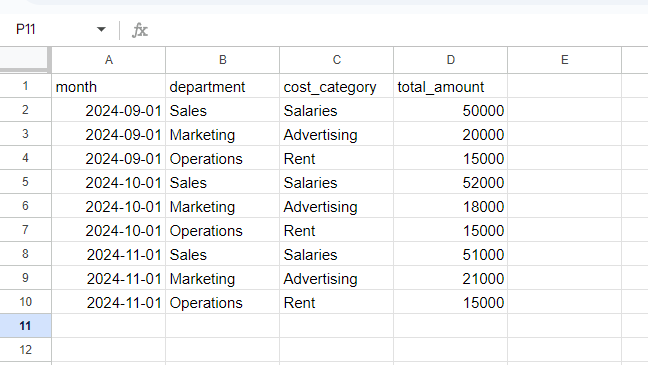
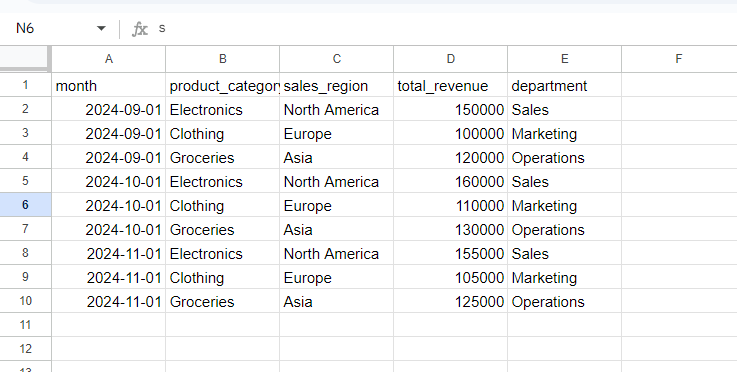
Once the data is imported, it is organized into tables. For example:
-
Expenses Table: Contains columns for month, cost category, department, and total
amount.
-
Revenue Table: Includes data about products, sales regions, and generated revenue.
Optimization:
- Use partitioning on the "month" column to access only the required data in queries.
- Apply clustering on the "product category" column for faster access.
3. Processing and Aggregating Data
The data is combined to answer specific questions. For instance:
Question: "What is the profit generated by each product category in the last three months?"
SQL Query:
Copy the code
        SELECT
            revenues.product_category,
            revenues.sales_region,
            DATE_TRUNC(revenues.month, MONTH) AS month,
            SUM(revenues.total_revenue) AS total_revenues,
            SUM(expenses.total_amount) AS total_expenses,
            SUM(revenues.total_revenue) - SUM(expenses.total_amount) AS profit,
            (SUM(revenues.total_revenue) - SUM(expenses.total_amount)) / NULLIF(SUM(revenues.total_revenue), 0) * 100 AS profit_margin
            FROM
            `datacare-441614.bigquery_dataset_12_9.Revenues` AS revenues
            LEFT JOIN
            `datacare-441614.bigquery_dataset_12_9.Expenses` AS expenses
            ON
            revenues.department = expenses.department AND revenues.month = expenses.month
            WHERE
            revenues.month BETWEEN '2024-09-01' AND '2024-11-30'
            GROUP BY
            revenues.product_category, revenues.sales_region, month
            ORDER BY
            month, revenues.product_category;
This query provides a clear view of profitability for each category.
4. Creating a Dashboard in Looker Studio
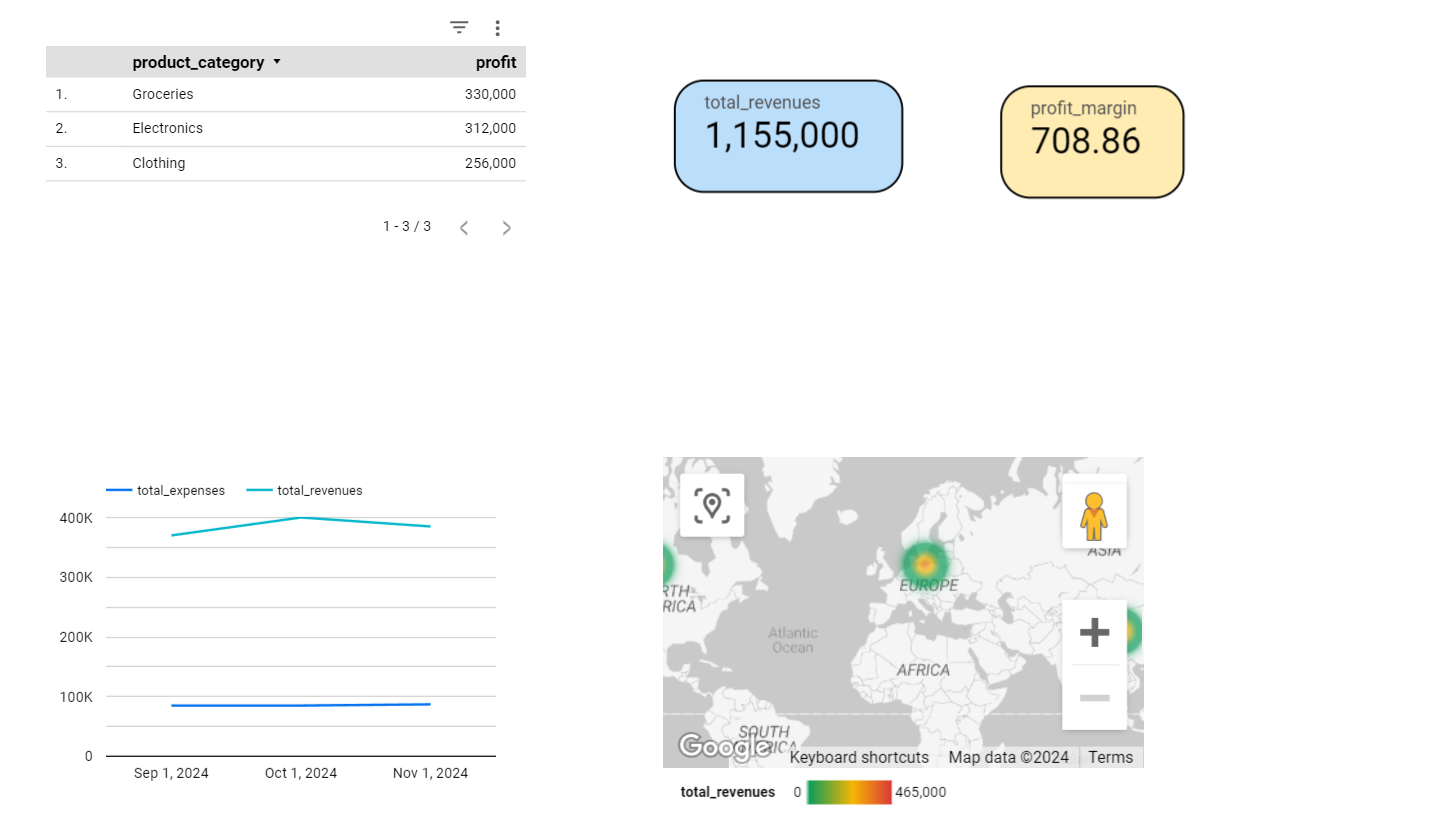
After the data is ready, it is connected to Looker Studio to create an interactive report.
What can the dashboard include?
- Line chart: Tracks revenue and expenses over the last 12 months.
- Map: Highlights regions with the highest sales.
- Table: Displays profitability by product category.
- KPI Indicator: Shows total profit margin or monthly total revenue.
5. Automating the Process
Complete automation makes a significant difference. Here’s how:
- Set up recurring jobs in BigQuery to update data regularly.
- The dashboard in Looker Studio updates automatically whenever changes are made in BigQuery.
- Add automated notifications to alert the team if there are significant deviations in expenses or revenues.
Concrete Results
Before:
Financial reports were generated manually, taking up to 20 hours per month and were often incomplete.
After:
- Reports are generated automatically, with no manual intervention.
- The finance team has real-time access to updated data.
- The time saved is redirected toward strategic analysis.

Key Considerations
- How are financial reports currently managed?
- Are data sources dispersed across multiple systems?
- How much time is spent centralizing this data?
If these questions highlight inefficiencies, it might be time to explore a more effective solution. For any inquiries about automating financial reports or understanding the process better, feel free to reach out!